Microsoft has significantly broadened the autonomous recovery capabilities of Windows 11. If a computer fails to boot, it can now independently acquire a patch. The system can also revert to a state from several hours prior. Alternatively, it can execute a comprehensive system reinstallation. This process downloads necessary drivers directly from the cloud. The corporation has ingeniously amalgamated both novel and preexisting tools into a unified recovery framework.
Combating Boot Failures
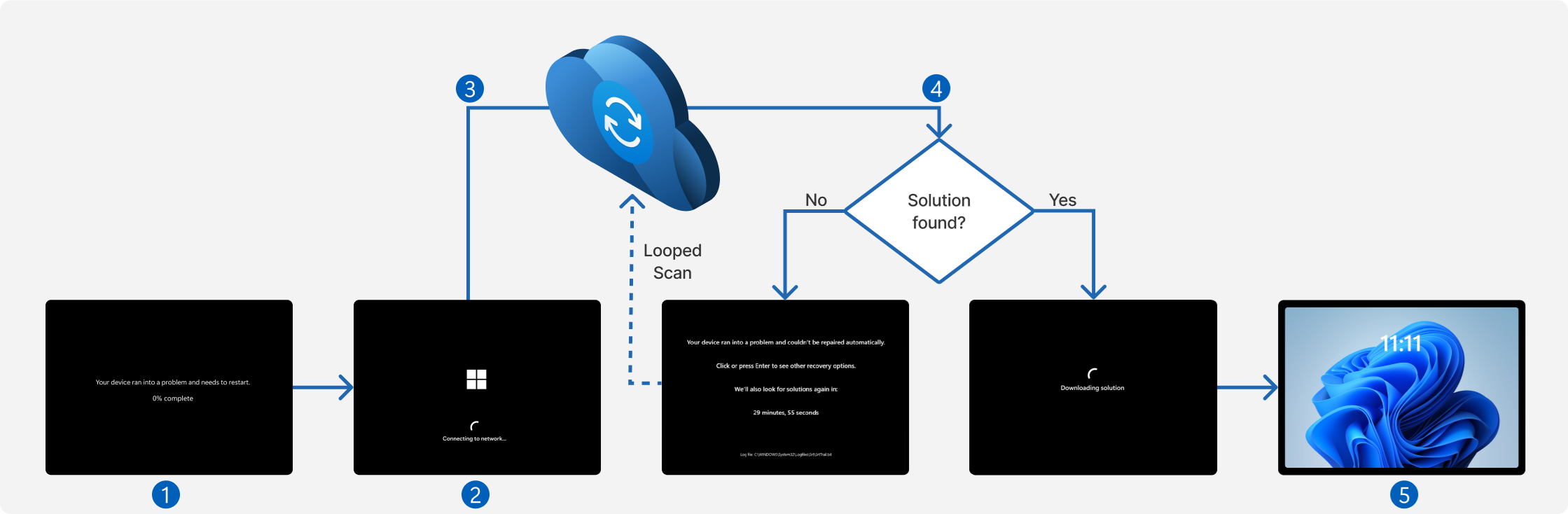
To combat widespread boot failures, Microsoft introduces the Quick Machine Recovery feature. Sometimes Windows repeatedly fails to launch properly. Under these circumstances, the machine transitions into a recovery environment. It establishes a network connection automatically. Next, it scrutinizes the Windows Update Center for a specialized patch.
Upon detecting a pervasive anomaly, Microsoft formulates this specific package. Subsequently, the device downloads, installs, and reboots autonomously. This requires absolutely no user intervention. This functionality is accessible in Windows 11 version 24H2 and subsequent iterations.
System State Rollbacks
Administrators confront localized issues across one or multiple terminals frequently. They can seamlessly revert the system to a predefined temporal state. Windows automatically chronicles the condition of the system and applications. It also safeguards configurations and local files. By default, the operating system generates a snapshot every 24 hours. It retains this archival data for up to 72 hours.
Restoration Process
Following a critical failure, the user simply selects the desired restoration point. The computer swiftly reverts to its preserved state within minutes. This capability operates seamlessly across Windows 11 Home, Pro, and Enterprise. It requires version 25H2 or a newer release.
Users must understand that this rollback inevitably encompasses local data. The system deletes any files, passwords, or certificates altered after the snapshot creation. Cloud-based repositories, such as OneDrive files, remain entirely untouched. To orchestrate a system restoration directly from the Windows environment, administrators require a BitLocker recovery key.
The Cloud Rebuild Feature
In instances of catastrophic system corruption, Microsoft is actively evaluating a ‘Cloud rebuild’ function. This formidable feature comprehensively formats the system drive. It retrieves a compatible Windows image and the latest monthly security update. The tool also downloads essential drivers directly from the Update Center. Finally, it completely reinstalls the operating system.
This innovative process entirely circumvents the need for physical installation media. Presently, the Cloud rebuild mechanism is accessible exclusively to Windows Insider participants. It operates within the experimental channel for devices governed by Microsoft Intune.
Maintaining Productivity During Crises
Workstations sometimes suffer physical devastation, get lost, or face isolation during an incident investigation. Organizations can temporarily provision a virtual workspace for the affected employee. They utilize Windows 365 Reserve for this purpose. Employees can effortlessly restore crucial configurations and corporate applications onto this ephemeral system. This maintains productivity while the primary machine remains inaccessible.
Best Practices for Recovery
Microsoft prudently advises initiating the recovery protocol using the least invasive methodology available. Initially, one might eradicate a problematic update or execute diagnostic routines. IT professionals can deploy Quick Machine Recovery before progressing to a system state rollback. The corporation recommends resorting to a complete system reinstallation strictly in dire scenarios. Users should attempt this only when more rudimentary techniques have proven utterly futile.
Support Our Threat Intelligence
If you find our technology report and cybersecurity news helpful, consider supporting our work.
 Buy Me a Coffee
PayPal
Buy Me a Coffee
PayPal