The Windows Task Manager has acquired a powerful new capability. The system utility now actively reveals which applications harness the Neural Processing Unit (NPU). It also monitors specialized neural cores within the graphics card. These novel metrics illuminate precisely where Windows directs artificial intelligence computations. Furthermore, they help users identify specific software issues. Sometimes an application improperly burdens the central processing unit or GPU. Users can see if it ignores the energy-efficient accelerator.
Microsoft clarified that this expansive statistical data is primarily designed to facilitate the rigorous analysis of localized AI workloads.
Detailed NPU Monitoring Capabilities
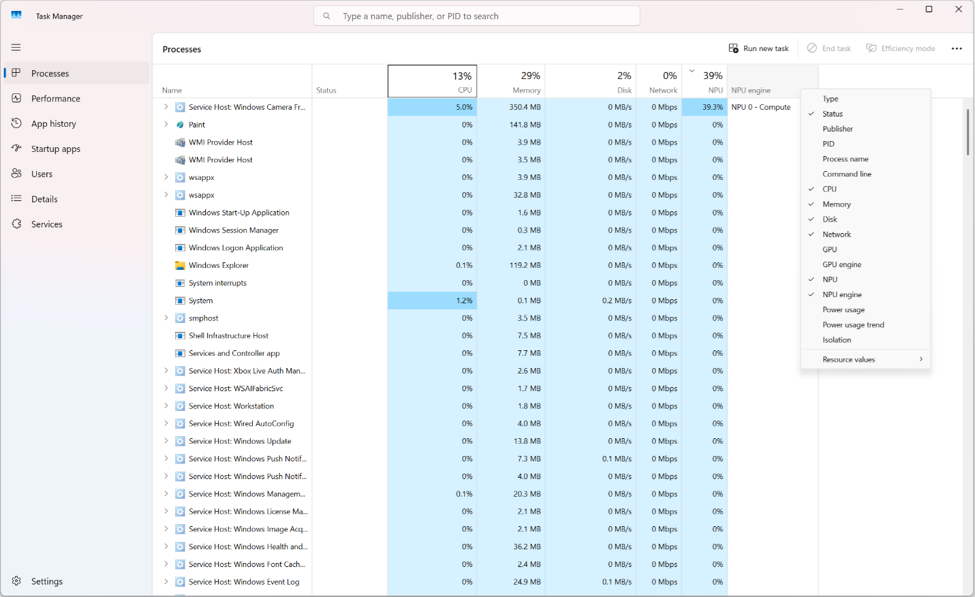
The most profound alteration concerns the NPU, a dedicated silicon block architected specifically to execute neural network operations. Within the “Processes,” “Users,” and “Details” tabs, optional columns designated “NPU” and “NPU Engine” have emerged.
The former illustrates the accelerator load generated by a specific process. Meanwhile, the latter allows users to pinpoint the exact computational block engaged in the task. Additionally, the “Details” tab now provides crucial metrics regarding both the dedicated and shared memory allocated to the NPU.
GPU Neural Core Tracking
The Task Manager has also evolved to monitor neural cores seamlessly embedded within graphics processing units. Within the “Performance” tab, Windows now displays these specific accelerators separately. Consequently, a user can monitor more than just the overall GPU workload. They can track the precise activity of hardware dedicated to neural network operations. Users can effortlessly activate these new parameters via the column header context menu.
Rollout and Implementation Schedule
Microsoft commenced testing this advanced statistical framework on March 30 within preliminary Windows 11 builds. By late May, these features successfully transitioned into the KB5089573 update for Windows 11 versions 24H2 and 25H2. This comprehensive package updated systems to builds 26100.8524 and 26200.8524. Subsequently, the June cumulative update fully incorporated all alterations from the May release.
Benefits for Software Developers
These expansive statistics will prove invaluable for developers engineering applications that depend upon localized neural networks. A program might be explicitly designed to execute a model via the NPU. However, various issues might force the system to utilize a different hardware block. These include an unsupported operation, a faulty driver, or an incompatible computational format.
Without supplementary diagnostic tools, a developer would struggle to notice this clandestine switch. This is especially true if the program continues functioning normally. It might simply begin consuming substantially more power or executing tasks at a sluggish pace.
Beyond Development: Everyday Utility
The utility of this update extends far beyond software development. Many common features execute across various computer components. Examples include background blur during video conferences, image processing, generative functions, and speech recognition. Engineers specifically crafted the NPU for such demanding computations.
Thus, it typically allows for significantly reduced power consumption. This provides a major benefit compared to placing a relentless load upon the CPU or GPU. The Task Manager now effortlessly assists users in determining the exact source of this load. This completely bypasses the need to install separate diagnostic software.
The Rise of the Copilot+ PC
Microsoft’s escalating focus on the NPU perfectly coincides with the widespread proliferation of Copilot+ PC devices. To achieve the prestigious Copilot+ designation, a device must feature a powerful neural processor. This chip needs a performance capability of at least 40 trillion operations per second. Furthermore, it requires a minimum of 16 gigabytes of RAM and storage capacity exceeding 256 gigabytes. Microsoft strategically utilizes the NPU to execute a substantial portion of its artificial intelligence functions locally within Windows.
Additional AppContainer Tracking
Alongside the NPU statistics, Microsoft thoughtfully introduced an optional “Isolation” column within the “Processes” and “Details” tabs. This parameter highlights applications operating securely within the AppContainer framework. This alteration does not relate directly to AI. However, it arrived packaged within the identical suite of Task Manager enhancements.
This continuous expansion of capabilities is gradually transforming the Task Manager. It is evolving far beyond a rudimentary tool used simply to terminate unresponsive programs. It now functions as a comprehensive instrument for observing modern hardware. Windows now empowers users to track AI hardware accelerators down to individual processes. This joins existing monitoring for the central processor, memory, storage drives, network, and graphics card. This visibility proves exceptionally beneficial on modern laptops equipped with a dedicated NPU.
Support Our Threat Intelligence
If you find our technology report and cybersecurity news helpful, consider supporting our work.
 Buy Me a Coffee
PayPal
Buy Me a Coffee
PayPal