At GDC 2026, Microsoft announced a significant addition to the DirectX 12 API: a dedicated dump file feature designed to automatically capture diagnostic data related to graphics driver failures. The collected logs can be forwarded to GPU manufacturers, enabling their engineering teams to analyze driver performance and investigate potential stability issues. This capability is scheduled to ship as part of Windows 11 26H2.
Why This Feature Was Needed
The Persistent Problem of GPU Driver Timeouts
Graphics driver timeouts formally known as Timeout Detection and Recovery (TDR) represent one of the most enduring pain points for both hardware manufacturers and end users. Microsoft has been actively working to address TDR-related issues through the WDDM 3.2 driver model, which introduced targeted improvements already available in Windows 11 24H2 and 25H2.
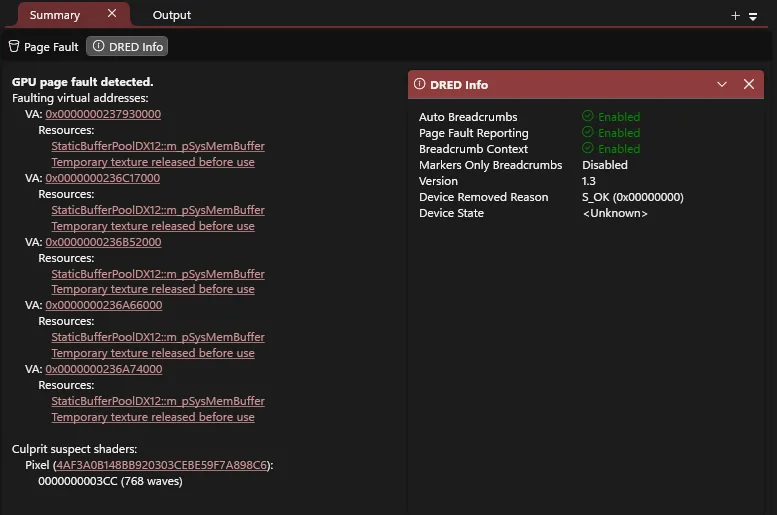
Despite those advances, Microsoft concluded that the existing instrumentation was insufficient. Diagnosing the root cause of a TDR event still required information that the platform could not reliably surface. The new dump file API is designed to close that gap by capturing precisely the data that driver developers need most.
What DirectX Dump Files Record
Crash-Time GPU Snapshots
The core function of the DirectX dump file feature is to record the state of the GPU at the exact moment a driver crash occurs. More specifically, it captures a snapshot of what the GPU was executing when the failure happened. Driver developers can then examine that snapshot to understand and diagnose TDR-related errors with far greater precision than was previously possible.
Dump files are written in the .dxdmp format and contain a rich set of contextual data, including hardware information, driver identity and version details, system configuration, and metadata identifying the affected application or game.
GPU Hardware State
The hardware state section captures the low-level condition of the GPU at the time of the crash. This includes register values, shader program counters, page fault virtual addresses, shader memory data, and command buffer contents.
DirectX Runtime and Kernel Data
Beyond raw hardware state, dump files also record higher-level runtime information. This encompasses Direct3D objects, pipeline state objects, device error data, adapter details, and CPU call stacks giving developers a comprehensive view of both the graphics stack and the system environment at the point of failure.
Three Collection Modes for Driver Vendors
Flexible Deployment for Different Scenarios
Microsoft provides GPU and graphics driver vendors with three distinct dump collection modes. Each mode is calibrated to balance diagnostic depth against hardware resource overhead, allowing vendors to choose the most appropriate level of instrumentation for a given deployment scenario.
On compatible Tier 2 hardware, the zero-overhead mode is enabled by default. This means dump data will be collected automatically for all users running a compatible graphics driver, without any explicit action required on their part.
Zero-Overhead Mode
This mode imposes virtually no runtime cost and places minimal demand on hardware resources. Its low impact makes it well suited for broad, large-scale deployment across the general user base, where collecting baseline diagnostic data without affecting performance is the priority.
Medium-Overhead Mode
The medium-overhead mode represents a balanced middle ground. It yields additional diagnostic data beyond what the zero-overhead mode captures, while keeping resource consumption at a manageable level. This mode is appropriate when more granular information is needed without the full cost of deep instrumentation.
High-Overhead Mode
The high-overhead mode is reserved for in-depth investigations. It captures the most comprehensive GPU and driver logs available, providing the richest possible dataset for diagnosing complex or elusive issues. The trade-off is a correspondingly higher demand on hardware resources, making this mode best suited for targeted diagnostic sessions rather than continuous deployment.
Broader Implications
The introduction of DirectX dump files represents a meaningful shift in how GPU driver stability issues will be investigated going forward. By standardizing the format and delivery mechanism for crash diagnostics, Microsoft reduces the friction between end-user reports and driver team analysis. For developers shipping games and graphics-intensive applications, this tooling promises faster resolution of driver-related bugs that have historically been difficult to reproduce and isolate.
Support Our Threat Intelligence
If you find our technology report and cybersecurity news helpful, consider supporting our work.
 Buy Me a Coffee
PayPal
Buy Me a Coffee
PayPal