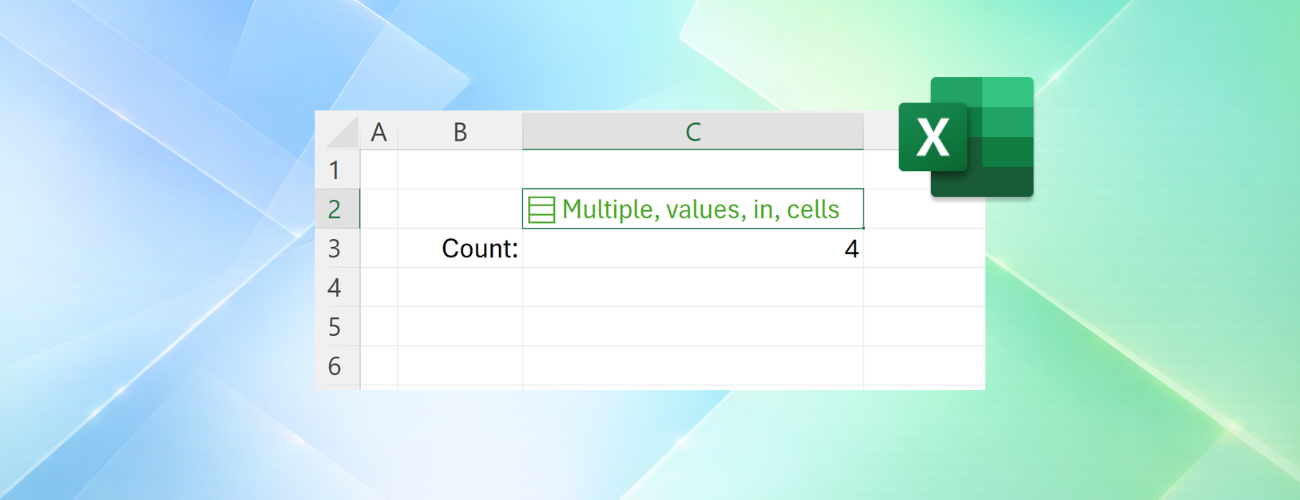
Microsoft is actively evaluating a revolutionary feature poised to fundamentally transform data processing within Excel: the extraordinary capability for a single cell to simultaneously accommodate multiple structured values. This profound update introduces discrete lists, cell-bound arrays, and sophisticated nested arrays. Currently, the experimental build supporting these advanced functionalities is systematically rolling out to Microsoft 365 Beta participants. Following rigorous validation, these capabilities will progressively debut for all stable release users.
Transitioning from Delimited Text to Authentic Lists
Historically, users frequently aggregated multiple distinct data points into a solitary text string within a cell. For instance, entering “John Doe, Floor Manager, 028” forced Excel to interpret the entire entry as an indivisible string. Consequently, users could not directly filter the data based upon a specific member, role, or identification number, severely impeding independent application during complex calculations.
The innovative list functionality elegantly resolves this limitation by recognizing these accumulated entries as autonomous, distinct items coexisting within the identical cell. Users can effortlessly generate a list via the “Insert” menu, the dedicated “List” command, or by utilizing the convenient “Ctrl+J” keyboard shortcut. Subsequently, they can manually input or seamlessly paste multiple values precisely delineated by standard, half-width commas or semicolons. The cell instantly displays a distinctive list icon; interacting with this icon reveals the individual items. Furthermore, users can intuitively add, delete, or modify these items by simply double-clicking the cell or depressing the F2 key. You can read the official announcement detailing how Excel now supports multiple values in a single cell on the Microsoft Tech Community blog.
The most profound paradigm shift lies in Excel’s newfound ability to independently recognize these discrete values. When filtering datasets, users can precisely select one or multiple items directly from the list, completely eliminating the archaic restriction of requiring exact matches against the entire, unbroken text string. Furthermore, when referencing a list dynamically, Excel can flawlessly return all contained values, elegantly spilling the resultant data into adjacent cells.
Confining Complex Arrays Within a Single Cell
While the list functionality primarily targets manually inputted data, the “Arrays in Cells” feature fundamentally alters how Excel stores the results of complex formulas. Traditionally, dynamic array formulas automatically spilled their myriad results across adjacent, unoccupied cells. This groundbreaking update empowers users to encapsulate an entire array as a singular, unified entity localized within one specific cell.
These encapsulated arrays can manifest in any conceivable dimension or shape, frequently generated autonomously via sophisticated formulas. For scenarios demanding an exceptionally compact spreadsheet that must simultaneously preserve multiple distinct computational results, this methodology dramatically reduces the reliance upon superfluous helper columns and cluttered temporary data regions. Imagine a comprehensive running log where a single row corresponds to an individual run. A solitary cell can effortlessly store a fluctuating number of split times. Subsequently, adjacent cells can seamlessly calculate the total elapsed time, the precise average pace, and identify the absolute fastest split.
Furthermore, nested arrays allow a primary array to internally harbor subordinate arrays. For example, divergent projects can independently possess wildly disparate task lists. Previously, associated formulas might have tragically returned truncated results or triggered cascading calculation errors. The introduction of nested arrays ensures that supported formulas seamlessly preserve the complete hierarchical structure, remaining fully available for subsequent, sophisticated calculations.
Novel Functions for Nested Array Manipulation
- FLATTEN: Specifically engineered to elegantly unroll and flatten nested hierarchical structures.
- HAS: Methodically interrogates an array to determine if it contains a precisely specified value.
- HASANY: Systematically evaluates whether an array contains any of the targeted, specified values.
- HASALL: Rigorously determines whether an array successfully contains all the targeted, specified values.
Support Our Threat Intelligence
If you find our technology report and cybersecurity news helpful, consider supporting our work.
 Buy Me a Coffee
PayPal
Buy Me a Coffee
PayPal