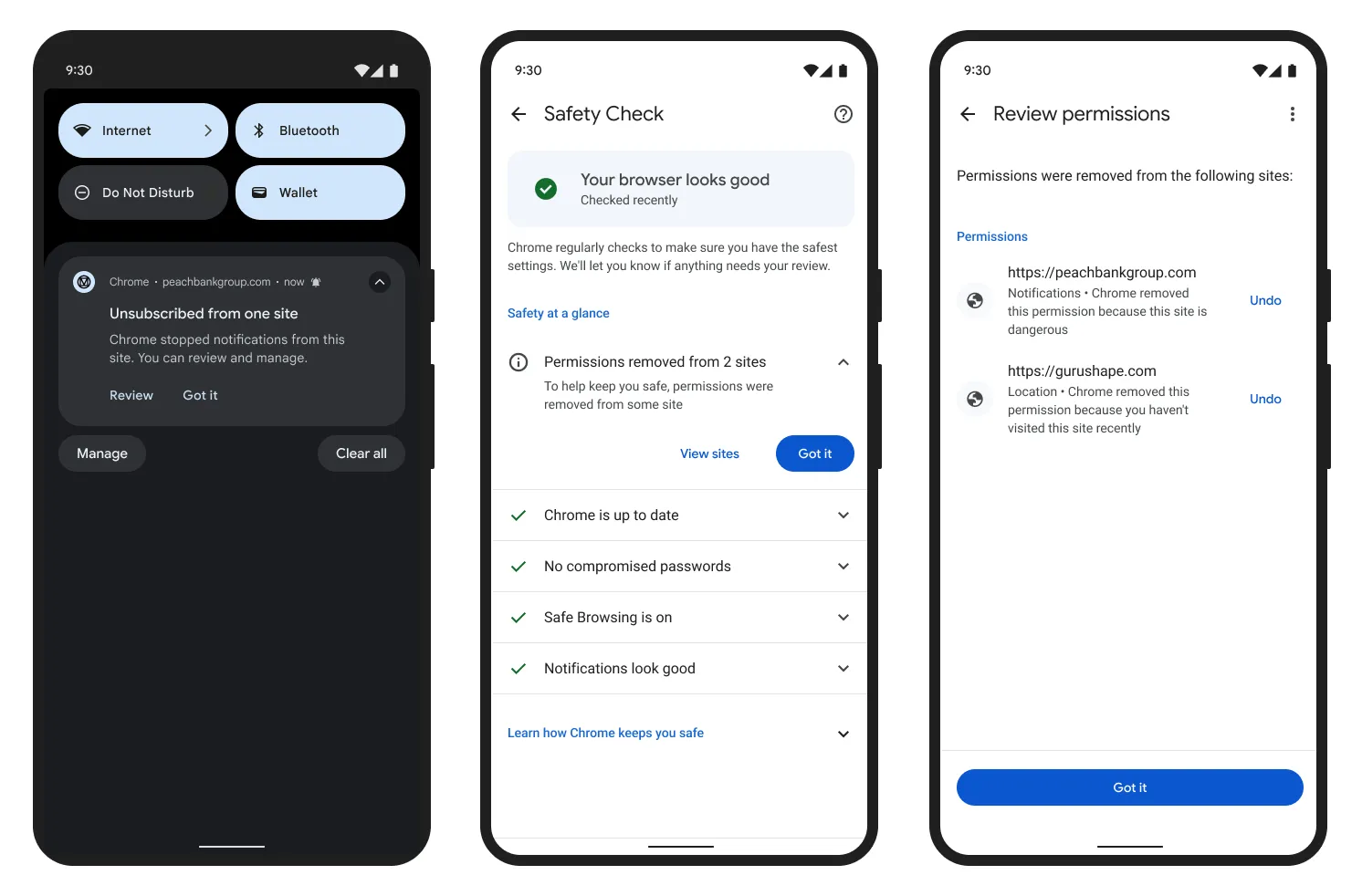
Google has published a detailed account of how Chrome shields users from websites that bombard the browser with intrusive notifications. In the first quarter alone, the company reduced the volume of such notifications on Android by more than 7 billion per day. To counter abuse, Chrome employs multiple overlapping layers of protection – a deliberate redundancy ensuring that malicious notification campaigns cannot succeed even if a single defense mechanism fails.
Automatic Permission Revocation for Inactive and Flagged Sites
One key measure targets sites that users have long since stopped visiting. Chrome automatically revokes notification permissions from these dormant origins. The browser applies the same revocation to sites that have repeatedly received warnings due to suspicious notification behavior. Users who wish to restore access to a trusted site may do so through Chrome’s Safety Check section.
Detecting Coordinated Networks of Abusive Sites
Chrome has also developed the capacity to identify entire networks of sites operating in concert. To expose these coordinated schemes, the system analyzes site behavior alongside background browser activity – including signals indicative of synchronized action across multiple origins. This approach allows Chrome to flag resources distributing malware or fraudulent messages even when the surface content of the pages in question appears entirely benign at first glance.
Firebase Cloud Messaging Rate Limits
A further layer of defense operates at the infrastructure level through Firebase Cloud Messaging (FCM), the delivery channel through which sites can push notifications to users. FCM’s abuse-detection logic weighs several signals: message volume, the amount of time users actually spend on a given site, the frequency of permission requests, and overall engagement metrics.
Sites identified as violating these thresholds face a hard cap of 1,000 messages per minute. Exceeding that limit triggers an HTTP 429 response from the server, effectively throttling the abusive campaign. For repeat offenders, the restrictions tighten progressively and are restored to normal only after a sustained period of compliant behavior. Google calculates that this mechanism makes large-scale notification campaigns substantially more costly to operate, meaningfully disrupting an attacker’s ability to dispatch messages at volume and velocity.
A Redesigned Permission Interface on Android
Google has also reformed the notification permission experience on Android itself. The redesigned interface allows users to decide whether they wish to receive notifications without being interrupted by an intrusive prompt mid-session. An earlier Chrome update on Android also introduced the ability to revoke a site’s notification permission with a single tap directly from the notification itself.
What Users Can Do
Users retain full control over notification permissions and are encouraged to exercise it. On desktop Chrome, notification settings are accessible within the Privacy and Security section. On Android, the same controls are reachable through the browser’s settings menu. Google recommends periodically reviewing the list of sites granted notification permissions and revoking access for any that are no longer needed or recognized. Together, these layered defenses reduce not only the risk of malware distribution and credential phishing, but also the unnecessary background activity that drains device performance and battery life.
Support Our Threat Intelligence
If you find our technology report and cybersecurity news helpful, consider supporting our work.
 Buy Me a Coffee
PayPal
Buy Me a Coffee
PayPal