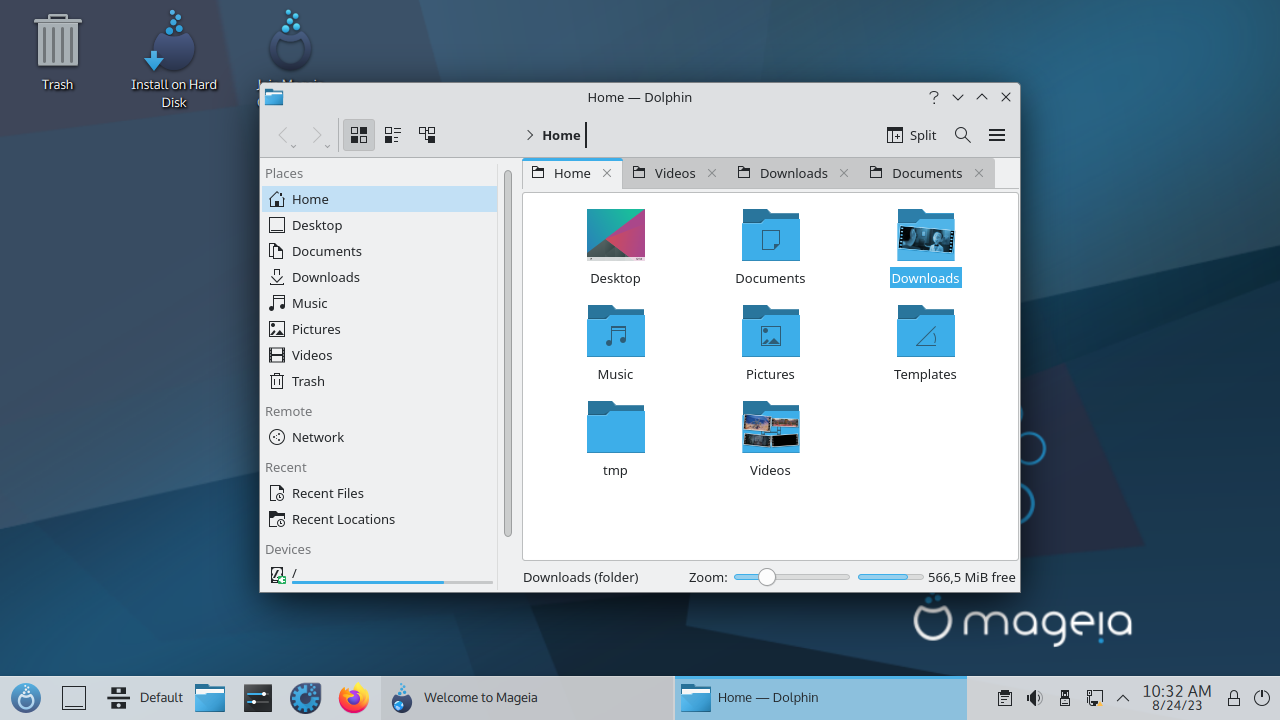
The Mageia 10 Linux release debuts with steadfast support for 32-bit x86 computers. Meanwhile, most major Linux distributions now focus exclusively on 64-bit systems. This new release proudly retains a dedicated edition for aging personal computers. Furthermore, it breathes life into legacy hardware requiring a 32-bit operating system.
A Legacy of Independence
Interestingly, this launch coincides with the fifteenth anniversary of the distribution’s inaugural release in June 2011. The project officially began one year prior as a fork of Mandriva. Subsequently, Mandriva itself carried the historic lineage of Mandrake Linux. Among Mandrake’s modern descendants, only Mageia preserves 32-bit x86 architecture support. Conversely, alternatives like OpenMandriva Lx, PCLinuxOS, and ROSA Linux abandon this specific edition entirely.
Diverse Desktop Environments
Users can access live GNOME and KDE Plasma images solely for x86-64 systems. However, the Xfce 4.21 edition accommodates both x86-64 and x86-32 architectures. Additionally, the development team meticulously crafted a Classic Installer ISO image. This versatile installer lets users select from nine distinct desktop environments. Furthermore, the Mageia 10 release notes detail sixteen available window managers. Notable options include standard GNOME, GNOME Classic, KDE Plasma, and the lightweight Liquidshell interface.
Robust Package Management
Mageia endures as a resolute RPM distribution, mirroring Mandrake’s legacy from nearly three decades ago. The robust system supports two primary package management tools. Users can employ the native urpmi or opt for DNF. Consequently, the graphical Rpmdrake frontend enhances the urpmi experience beautifully. Meanwhile, users can easily install dnfdragora as an independent component. Major software packages, such as Google Chrome, remain readily accessible. This availability stems from a shared package foundation with RHEL, Fedora, SUSE, and openSUSE. Nevertheless, packages intended for other RPM distributions might function improperly here. Ultimately, Mageia has evolved independently from its sibling branches for over twenty-five years.
Software Integrations and Flatpak
The system includes Flatpak pre-installed by default. Yet, it thoughtfully omits pre-loaded Flatpak applications to save space. This versatile format proves highly beneficial for software lacking native packages. Unfortunately, the 32-bit edition reaps fewer rewards from this inclusion. Currently, developers rarely compile modern Flatpak applications for older hardware architectures.
Modern Foundations, Classic Methods
Fresh components, including the Linux 6.18 kernel, form the system’s robust foundation. Despite these modern updates, the distribution firmly retains certain traditional methodologies. For instance, the system mandates separate root and user accounts. While sudo comes pre-installed, it remains unconfigured for standard daily operations. Furthermore, Mageia seamlessly integrates systemd while preserving a remarkably lightweight graphical footprint.
Performance and Resource Efficiency
During rigorous testing, the 32-bit Xfce edition performed admirably within a VirtualBox environment. It consumed merely 633 megabytes of idle memory and 7.8 gigabytes of disk space. Alternatively, KDE Plasma 6.5.5 offers a seamless choice between X11 and Wayland display servers. It occupies comparable storage space but utilizes roughly 1.7 gigabytes of idle RAM. The Xfce interface utilizes a classic dual-panel layout reminiscent of GNOME 2. Conversely, Plasma presents a remarkably streamlined desktop experience. Liquidshell conserves system resources effectively, though it functions as a somewhat basic interface.
The Final Verdict for Legacy Users
An elegant welcome screen assists users in installing supplementary applications effortlessly. It also simplifies switching repositories and executing essential post-installation tasks. The renowned Mageia Control Center handles most system configurations without requiring complex command-line interactions. Moreover, the project’s comprehensive wiki thoroughly explains installation procedures, package management, and unique distribution features.
The Mageia launch emerges amidst a widespread industry departure from 32-bit architectures. Countless Linux projects continue abandoning these legacy builds altogether. Therefore, this new release serves as a vital lifeline for specific users. Owners of aging Windows 10 x86 systems or hardware requiring specialized drivers will find immense value here. Ultimately, it stands as one of the few contemporary options within the desktop Linux landscape.
Support Our Threat Intelligence
If you find our technology report and cybersecurity news helpful, consider supporting our work.
 Buy Me a Coffee
PayPal
Buy Me a Coffee
PayPal