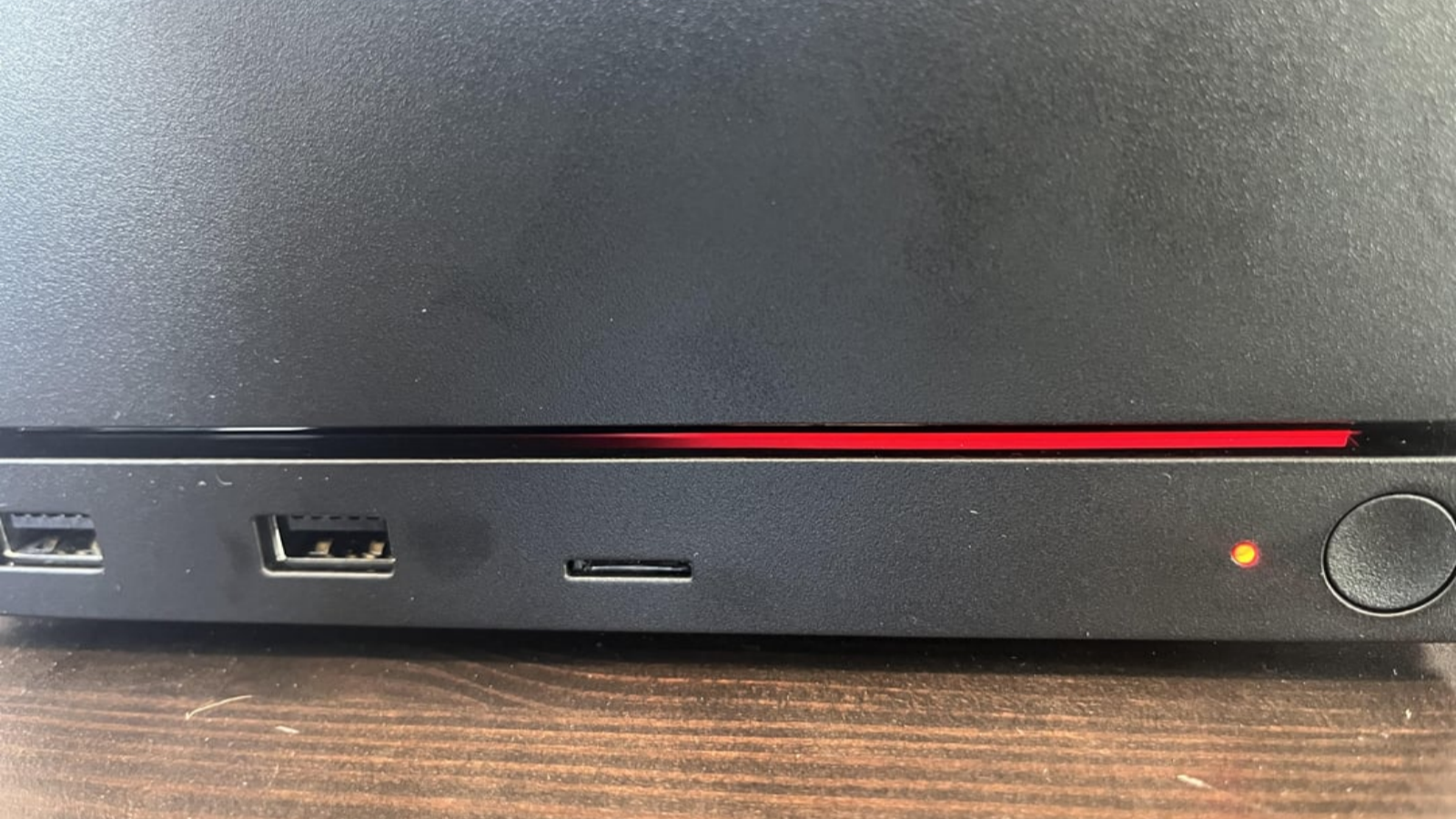
Valve utilizes an ambient light strip within the Steam Machine to indicate hardware malfunctions. Recently, a gamer’s newly purchased unit displayed a “Red Line of Death” just twenty minutes after booting up. The ambient light illuminated in a solid half-red line. This serves as an eerie homage to the infamous Xbox RROD.
According to Valve’s technical documentation, this crimson indicator signals a catastrophic GPU failure. Consequently, this severe issue might necessitate returning the console to the factory for a complete chip replacement.
Miraculous Recovery After Power Disconnection
Hardware anomalies often behave in profoundly mysterious ways. The afflicted user attempted numerous power cycles, yet the system vehemently refused to reboot. Furthermore, the monitor displayed absolutely zero output. After enduring multiple failed restarts, the frustrated gamer unplugged the power and retired for the night.
Astonishingly, upon reconnecting the power the following day, the machine resurrected itself. It functioned flawlessly once again. As noted in a recent community discussion regarding this hardware anomaly, the user also ventured into the BIOS to implement minor adjustments.
Currently, the precise catalyst for this phenomenon remains entirely unknown. Therefore, Valve’s engineers will likely need to acquire the user’s system logs to perform a comprehensive diagnostic analysis.
The Perils of Integrated Graphics
Generally, encountering a GPU failure presents a rather severe predicament. This rings especially true because the Steam Machine relies entirely on an integrated, onboard GPU.
If dealing with a dedicated graphics card, one could simply extract the component, clean the contact pins, and reseat the power cables. However, onboard GPU failures leave users with virtually zero avenues for direct intervention. Ultimately, if the machine definitively refuses to recover, returning it to Valve for professional repair remains the sole viable recourse.
Valve’s Official LED Diagnostic Guide
Valve prudently provides comprehensive indicator light guidelines within their official documentation. Depending on the specific malfunction, the Steam Machine projects distinct hardware error codes.
- Solid Red Full Illumination: This signifies catastrophic hardware overheating. The CPU temperature has breached 95 degrees Celsius, or the GPU has exceeded 90 degrees Celsius.
- Solid Red Fourth Segment: The system fundamentally fails to detect the installed RAM.
- Solid Red Third and Fourth Segments: The system detects a critical GPU failure. This perfectly mirrors our unfortunate gamer’s plight.
- Solid Red Second Segment: The motherboard cannot identify the solid-state drive.
- Solid Red First and Second Segments: Memory training has failed. This occurs when the motherboard unsuccessfully attempts to initialize RAM during startup.
Why Firmware Fixes Matter
Among these documented errors, the GPU failure undeniably stands as the most critical threat. Because the device employs an integrated GPU, average users simply cannot resolve the issue independently. Therefore, if the system stubbornly refuses to revive, Valve will almost certainly replace the entire chip.
Presently, this single user appears to be the isolated victim of this specific malfunction. However, if similar cases continuously surface, Valve must inevitably conduct a rigorous investigation. Otherwise, relying solely on factory hardware replacements would incur exorbitant costs. Ultimately, any glitch solvable via a simple BIOS firmware update remains a trivial inconvenience.
Support Our Threat Intelligence
If you find our technology report and cybersecurity news helpful, consider supporting our work.
 Buy Me a Coffee
PayPal
Buy Me a Coffee
PayPal