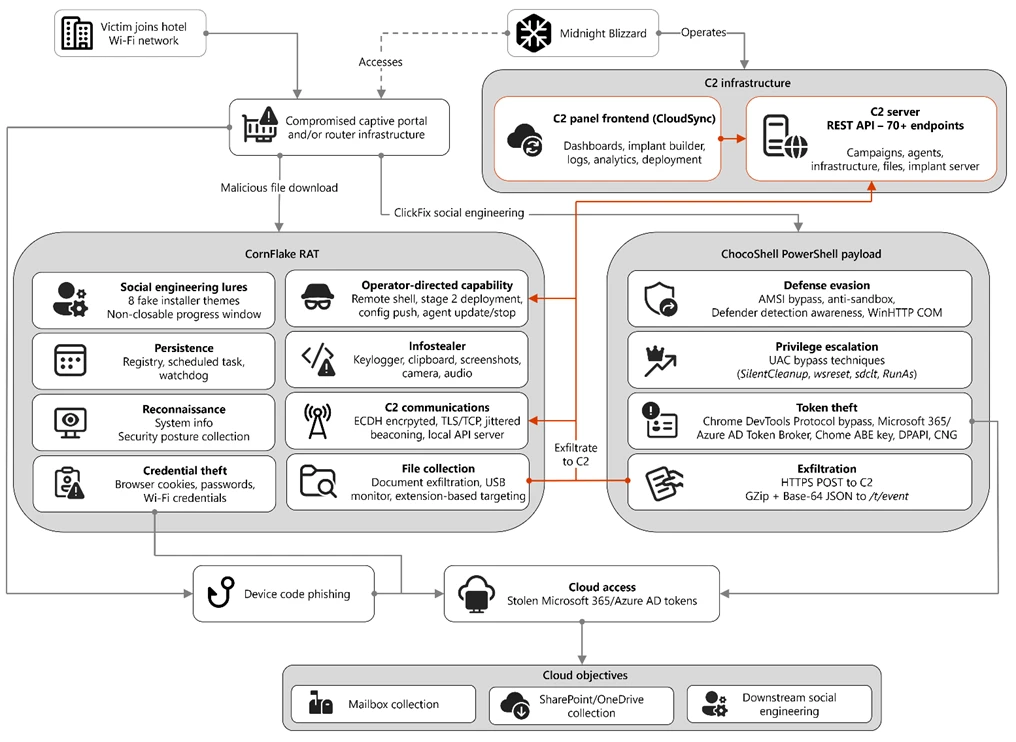
Overview of the CaptiveCrunch attack flow
A routine connection to hotel Wi-Fi can end in the theft of corporate email, passwords, and sensitive files – all before the traveler ever clicks a suspicious link. In the CaptiveCrunch campaign, threat actors compromise guest network gateways and redirect connected devices to phishing pages or malware-serving infrastructure.
Scope and Timeline of the Campaign
Attacks against Wi-Fi networks began in early May 2026 and have since affected multiple countries. Hotels, conference centers, and other organizations operating captive-portal guest networks were among the first confirmed victims.
However, the potential scale extends far beyond the hospitality sector. Airports, co-working spaces, universities, medical facilities, and mass-event venues rely on identical infrastructure. Any environment offering guest Wi-Fi with a captive portal represents a viable target.
How Attackers Gain Initial Access
The precise method of initial compromise has not yet been definitively established. Nevertheless, the striking similarity of hardware and management systems across multiple breached networks suggests the attackers targeted not merely individual hotels, but potentially shared services that administer numerous guest portals simultaneously.
Exposed Interfaces and Weak Credentials
According to threat intelligence researchers tracking DNS poisoning in the hospitality sector, adversaries likely identified exposed SSH interfaces, SNMP endpoints, and web-based administration panels. From there, they exploited weak or reused credentials to gain administrative control.
DNS Poisoning: The Core Attack Technique
Once attackers obtain administrative access to a network gateway, they alter how DNS queries are processed. A user’s device requests the address of a legitimate website. The compromised hotel network returns the IP address of the attacker’s server instead.
This technique requires no malicious email, no infected attachment, and no pre-compromised laptop. Connecting to the network is sufficient.
Why Manual DNS Settings Offer Little Protection
Manually specifying a public DNS server such as 8.8.8.8 does not reliably defend against this attack. If the device transmits its query without encryption, the controlling gateway can intercept the packet and return a forged response before the legitimate resolver ever replies.
Reliable defenses include a full-tunnel VPN and strictly enforced DNS over HTTPS or DNS over TLS – configured to fail closed rather than fall back to unencrypted DNS if the encrypted channel breaks.
WPAD Abuse in a Third of Observed Cases
In approximately one-third of the analyzed incidents, attackers also leveraged WPAD – the Web Proxy Auto-Discovery mechanism. A successful WPAD attack delivers a malicious PAC file capable of routing browser traffic, Windows components, and enterprise application traffic through an adversary-controlled proxy. In network logs, such connections can appear as routine HTTPS traffic, complicating detection significantly.
The Fake Update Lure
After a device connects to Wi-Fi, the browser or operating system automatically performs an internet connectivity check. CaptiveCrunch intercepts this probe and presents a counterfeit alert announcing a required update – for a browser, Windows, a driver, an antivirus engine, or a network component.
These pages employ the ClickFix technique, prompting the victim to download a file or paste a command directly into Windows Terminal or PowerShell. Separate instructions targeting Android users were also identified, urging them to install an APK file. No confirmed mobile infections have been documented to date.
CornFlake: The Primary Windows Implant
The principal malicious tool deployed against Windows systems is a remote access trojan named CornFlake, written in Go. Upon execution, the program displays a convincing system update or verification window. In the background, however, it copies itself into the AppData directory and registers as a service named “Cloud Sync Service.”
Persistence Mechanisms
CornFlake employs multiple persistence techniques: startup entries, scheduled tasks, and a watchdog process that restores deleted components. Removing the trojan without addressing all three layers leaves the infection active.
Data Collection Capabilities
CornFlake harvests system information, records keystrokes, monitors the clipboard, captures screenshots, accesses the camera and microphone, and scans connected USB drives. Commands are executed via cmd.exe or PowerShell. Operators can search for documents, archives, images, source code, databases, email files, and cryptographic keys – then exfiltrate them to a command-and-control server. A single collection cycle can transmit up to one thousand files totaling 500 MB.
ChocoShell: In-Memory Credential Theft
A second tool, ChocoShell, is a PowerShell script that operates primarily in memory. It steals browser cookies, saved passwords, Microsoft 365 single sign-on tokens, and saved Wi-Fi credentials.
ChocoShell attempts to disable PowerShell script-block logging via AMSI, blocks Microsoft Defender signature updates, and employs multiple User Account Control bypass techniques. The script fully supports modern Chromium data-protection mechanisms – including App-Bound Encryption – and extracts credentials from Chrome, Edge, Brave, Opera, Vivaldi, and other Chromium-based browsers.
FruitStone: The Operator Control Panel
Compromised machines are managed through a new command-and-control interface called FruitStone. The panel displays the device name, username, Windows version, hardware specifications, time zone, domain membership status, and the presence of a camera or microphone.
Through FruitStone, operators can open a remote command shell, browse the file system, retrieve screenshots, keystroke logs, and clipboard contents, activate the camera or microphone, modify trojan configuration, and push updated versions of CornFlake. The panel supports multiple operator accounts and displays active sessions with associated IP addresses.
Microsoft 365 Device-Code Phishing
A parallel branch of the campaign targets cloud accounts directly. Victims are presented with a device code and instructed to enter it on the legitimate Microsoft sign-in portal. The user sees a genuine Microsoft domain and independently completes the authorization – but in doing so, grants access to a session the attackers created.
Upon successful verification, the adversaries gain access to Microsoft 365, register a device in Entra ID, read the victim’s email, and harvest data from the cloud account. Multifactor authentication provides no protection in this scenario, because the victim completes it on behalf of the attacker’s session.
AI-Assisted Development
Artificial intelligence played a role in the campaign’s development, though the full scope remains undisclosed. The source code of ChocoShell contains detailed inline comments, references to specific detection mechanisms, and explanations of the chosen evasion techniques. The uniform style and unusually thorough annotations suggest that portions of the code were generated or refined with AI assistance.
Recommendations for Travelers and Organizations
Hotel, airport, and other guest networks should be treated as inherently untrusted environments. For access to email and corporate services, a mobile hotspot, eSIM, or full-tunnel VPN is strongly preferable.
Under no circumstances should users install updates, certificates, diagnostic utilities, or any software prompted by a captive portal page. Updates should be applied exclusively through operating system settings or official app stores.
Organizations should consider blocking the OAuth device-code flow for employees who have no legitimate need for it, deploying phishing-resistant multifactor authentication, and restricting corporate devices from connecting to unmanaged wireless networks.
Support Our Threat Intelligence
If you find our technology report and cybersecurity news helpful, consider supporting our work.
 Buy Me a Coffee
PayPal
Buy Me a Coffee
PayPal